
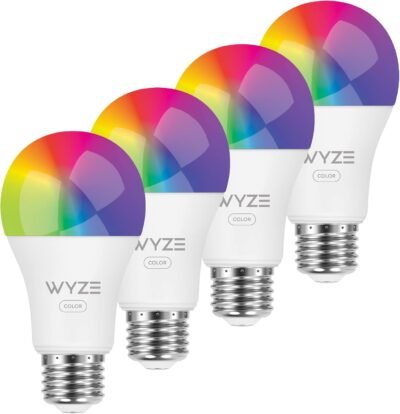
The Wyze Bulb Color smart light bulb is designed to bring flexible, affordable smart lighting into everyday spaces without complicated setup or expensive hubs. If you’re looking to upgrade your home lighting with customizable RGB color, tunable white tones, and voice control, this WiFi smart bulb offers a simple, reliable solution. I chose this product because it delivers premium smart-lighting features—brightness, automation, and color accuracy—at a price point that makes sense for whole-room or multi-room setups. It’s especially effective for ambient lighting, work-from-home environments, and mood-based scenes, making it one of the most practical smart color light bulbs available today.
Best For
Smart-home beginners, renters, remote workers, gamers, and anyone who wants customizable lighting scenes without installing switches or hubs.
Why This Wyze Bulb Color Stands Out
Smart lighting often feels overcomplicated or overpriced. Many RGB bulbs sacrifice brightness, require extra hubs, or lock features behind subscriptions. The Wyze Bulb Color avoids those issues by focusing on what actually matters in daily use: strong brightness, reliable app control, and easy automation.
What I like most about this smart bulb is how balanced it feels. At 1100 lumens, it’s bright enough to replace a standard overhead bulb—not just accent lighting. Unlike cheaper RGB bulbs that look dim or washed out in white mode, this one delivers clean, usable light for working, reading, or cooking, then switches effortlessly into full color for evenings or ambiance.
In real-world use, the Wyze app makes setup fast and intuitive. Scheduling lights to fade in during mornings or shift to warmer tones at night feels seamless, and voice control works consistently with both Alexa and Google Assistant. The fact that this comes as a four-pack also makes it practical for lighting an entire room uniformly rather than mixing bulb types.
For anyone building a smart home gradually, this bulb offers flexibility without commitment—you can start with one room and expand easily.
Key Features
Full RGB color spectrum for mood, gaming, and accent lighting
1100-lumen brightness suitable for primary room lighting
Tunable white range from warm to cool for day-to-night use
WiFi-enabled smart bulb—no hub required
Voice control support with Alexa and Google Assistant
App-based schedules and scenes for automation and routines
Energy-efficient LED design with long lifespan
Standard A19 shape fits most lamps and fixtures
Specs Table
| Feature | Details |
|---|---|
| Bulb Type | A19 Smart LED |
| Brightness | 1100 lumens |
| Color | RGB + Tunable White |
| Color Temperature | Warm to cool white |
| Connectivity | WiFi (2.4 GHz) |
| Voice Assistants | Alexa, Google Assistant |
| Power Usage | Energy-efficient LED |
| Pack Size | 4 bulbs |
| Ideal Use | Bedrooms, offices, living rooms, accent lighting |
How the Wyze Bulb Color Works
The Wyze Bulb Color connects directly to your home WiFi and is controlled through the Wyze app or voice assistants. Once installed, you can adjust brightness, color, and temperature instantly or automate changes throughout the day.
From experience, this works best when you create simple routines—cool white light during work hours, warmer tones in the evening, and color scenes at night. The bulb responds quickly to commands, and transitions feel smooth rather than abrupt. Unlike older smart bulbs, there’s no noticeable delay when turning lights on or off through the app or voice control.
Because it doesn’t require a hub, setup stays simple: screw in the bulb, pair it in the app, and you’re ready to go.
Wyze Bulb Color vs Other Smart Lighting Options
vs Premium Smart Bulbs: Wyze offers comparable brightness and color control at a significantly lower cost, making it better for multi-bulb rooms.
vs Basic White Smart Bulbs: You gain full RGB color and mood lighting instead of just on/off or dimming.
vs LED Light Strips: Bulbs provide functional overhead lighting, while strips are better suited for decorative accents only.
For most homes, the Wyze Bulb Color hits the sweet spot between functionality, brightness, and value.
Who This Is For
Smart-home beginners
Renters who can’t install smart switches
Remote workers needing adjustable lighting
Gamers and content creators
Anyone wanting room-wide ambient lighting
Who This Is Not For
Users needing Zigbee or Thread support
Outdoor or weather-exposed lighting setups
Those wanting physical color remotes instead of app control
When to Use Wyze Bulb Color
Work Hours: Bright, cool white for focus and productivity
Evenings: Warm lighting for relaxation
Gaming & Media: RGB scenes for immersion
Wake-Up Routines: Gradual brightness to start the day
Hosting: Instantly change room mood with presets
Frequently Asked Questions
How bright is the Wyze Bulb Color compared to a regular bulb?
At 1100 lumens, it’s brighter than a standard 60W bulb and suitable for main room lighting.
Does it need a hub to work?
No, it connects directly to WiFi and works through the Wyze app.
Can I control multiple bulbs at once?
Yes, you can group bulbs into rooms and control them together.
Does it work if the internet goes down?
Automation and app control require WiFi, but the bulb will retain its last setting.
Is this good for daily lighting or just accent use?
It works well for both—bright enough for daily use and flexible enough for ambiance.
Explore More Smart Home Lighting
→ Smart desk lamps and ambient lighting
→ Voice-controlled home automation devices
→ Wireless charging and workspace tech
This page contains affiliate links. If you purchase through these links, I may earn a commission at no extra cost to you.
Reviews
There are no reviews yet.