
Why I Chose This Product
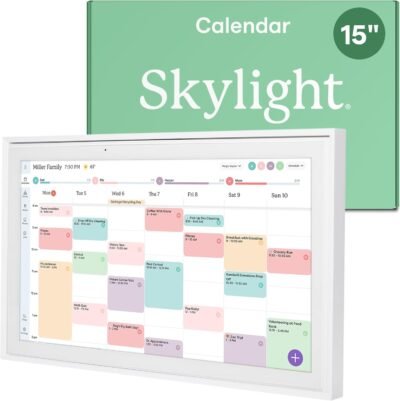
I chose the Skylight Calendar because it brings hands‑on simplicity and visibility to scheduling — no login hassles or app downloads required. Unlike phone or computer calendars tucked away in apps, this digital display sits where you can see it daily, turning planning from an individual task into a shared experience.
In everyday use, what stands out is how easy it is to send calendar items and reminders via email from anyone’s device — perfect for connecting with far‑away partners or family members. The responsive touchscreen makes adjusting events, adding notes, and browsing weekly or monthly views intuitive, even for less tech‑savvy users.
This calendar removes the guesswork from planning and reduces the mental load of keeping up with everyone’s commitments — a small but impactful boost to daily coordination and connection.
Best For
Families coordinating schedules
Couples in long‑distance relationships
Remote workers sharing shared household and personal calendars
Students managing school and activity schedules
Key Features
Key Features:
Large touchscreen display – Clear, easy‑to‑read shared calendar
Interactive planning tools – Add events, reminders, and notes
Share via email – Family and partners can send entries from anywhere
Weather and daily info – See useful day‑of details at a glance
Simple setup – Quick to connect to Wi‑Fi and start using
Always‑on display – Visible family planner that stays up
Specs Table
| Feature | Details |
|---|---|
| Brand | Skylight |
| Model | Skylight Calendar |
| Display | Touchscreen, large format |
| Connectivity | Wi‑Fi |
| Use | Shared calendar & planner |
| Input | Touchscreen and email send‑to‑frame |
| Setup | Quick and intuitive |
| Features | Calendar, reminders, shared events, weather |
| Integration | Works without smartphone apps |
How the Skylight Calendar Works
The Skylight Calendar connects to your home Wi‑Fi and displays a shared calendar interface that can be updated via email. Family members or partners can send events, reminders, and notes to the calendar from anywhere — especially useful for long‑distance connections where shared planning matters. The touchscreen lets you interact directly with the calendar for edits, viewing schedules, and adding details. At a glance you’ll see daily events, reminders, and even weather information.
Skylight Calendar vs Traditional Calendars
vs Paper Wall Calendars:
Paper calendars lack automation or reminders. Skylight gives you dynamic, always‑updated planning with visual clarity and real‑time edits.
vs Smartphone Calendars:
Apps may be private or hidden behind login screens. Skylight puts your shared schedule front and center so everyone sees and uses it daily.
vs Smart Displays:
Smart displays offer many features but can be cluttered with unrelated apps. Skylight focuses solely on calendar and shared planning, making it more intuitive for daily coordination.
For families and long‑distance partners who want seamless shared planning without app overload, this device truly simplifies coordination.
Who This Is For
Busy families with multiple schedules
Couples in long‑distance relationships
Remote workers needing shared planning at home
Students and roommates coordinating activities
Who This Is Not For
Users who prefer all planning in phone apps only
Those wanting a full smart assistant display
When to Use Your Skylight Calendar
Daily schedule view at home or office
Planning appointments and family activities
Sending reminders and shared events from afar
Keeping long‑distance partners in sync
Frequently Asked Questions
Can multiple people send calendar items?
Yes — events can be sent via email from multiple people.
Is it easy to set up?
Yes — connect to Wi‑Fi and start in minutes.
Does it show weather?
Yes — daily weather is integrated into the display.
Is the touchscreen responsive?
Yes — touch navigation is smooth and intuitive.
Can it replace phone calendars?
It complements or replaces shared calendars, especially for household or visible planning.
Related Collections
→ Tech Gifts Hub
→ Couples Tech
→ Long Distance Tech
This page contains affiliate links. Purchasing through these links may earn a commission at no extra cost to you.



Reviews
There are no reviews yet.