
Why I Chose This Product
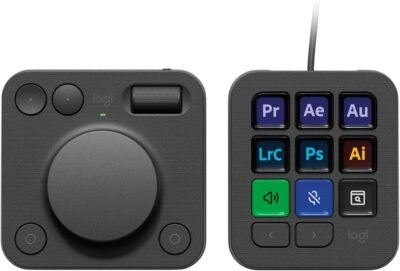
I chose the Logitech MX Creative Console because it bridges the gap between creative software and hands‑on workflow control. Unlike standard keyboard and mouse inputs, this console brings physical control surfaces — a dial with precise adjustments and a keypad with visual feedback — to common creative tasks like timeline scrubbing, brush resizing, tool activation, and more. Profiles and icons change automatically based on the app you’re using, keeping your most useful shortcuts within easy reach and allowing you to stay in the flow rather than hunting menus.
For anyone spending serious time in apps like Photoshop, Premiere Pro, Lightroom, or even productivity tools like Zoom and Spotify, this device turns complex sequences into simple dial twists or button presses — saving time and enhancing focus.
Best For
Photo and video editors
Digital artists and graphic designers
Workflow automation and macros
Power users with repetitive tasks
Multimedia content creators
Key Features
Key Features:
Customizable LCD keypad – Nine display keys that show icons or actions you assign per application
Smart analog dial – Precise control for zoom, scrub, brush size, timeline navigation, and more
Fluid roller & buttons – Additional controls to navigate and adjust quickly
App‑specific profiles – Assign custom controls for different software workflows
Logi Options+ customization – Deep personalization via companion software
Multi‑app compatibility – Works with Adobe Creative Cloud, design tools, communication apps, and more
USB‑C + wireless dialpad – Wired keypad and wireless (Bluetooth/Logi Bolt) dialpad connectivity available
Includes creative software benefit – Complimentary Adobe Creative Cloud membership for a limited time on qualifying purchases
Specs Table
| Feature | Details |
|---|---|
| Brand | Logitech |
| Product Type | Custom workflow control console |
| Controls | LCD programmable keypad + analog dialpad |
| Connectivity | USB‑C (keypad), Bluetooth/Logi Bolt (dialpad) |
| Customization App | Logi Options+ |
| Power | USB + batteries for dialpad (varies) |
| Compatibility | macOS & Windows |
| Software Support | Adobe CC, Premiere, Photoshop, Lightroom, and more |
| Use Cases | Editing, productivity, shortcuts & automation |
How the Logitech MX Creative Console Works
The Logitech MX Creative Console pairs two control modules — a dialpad and a keypad — to give physical inputs beyond your keyboard. The dialpad features an analog dial, roller, and buttons for precise adjustments and navigation. The keypad has nine programmable LCD keys that show icons tied to actions you assign. Through the Logi Options+ app, you can customize each control to match the most useful functions of your favorite apps, and load multiple pages of shortcuts per profile for deeper automation.
MX Creative Console vs Other Control Devices
vs Keyboard Shortcuts:
Traditional key combos require muscle memory. The creative console brings visual, tactile controls that reduce cognitive load and speed up workflows.
vs Standard Macro Pads:
Basic macro pads assign buttons but lack adaptive input. This console’s dynamic profiles and app context awareness provide deeper, workflow‑specific responsiveness.
vs Competitor Decks / Stream Controllers:
Unlike fixed macro buttons alone, the MX Creative Console combines physical dials and screen icons for adaptive feedback, making it ideal for nuanced creative adjustments.
Who This Is For
Creative professionals in photo/video editing
Designers streamlining workflows
Advanced power users automating repetitive tasks
Multitaskers switching between creative apps
Who This Is Not For
Users who rarely use creativity‑focused applications
Those who prefer traditional keyboard/mouse workflows exclusively
When to Use Your Logitech MX Creative Console
Editing photos and videos
Designing graphics and layouts
Adjusting sound & visual parameters
Automating repetitive tasks and tools
Frequently Asked Questions
Can I customize the dial for any action?
Yes — assign dial behavior to adjust parameters, scroll timelines, zoom, or trigger actions.
Does it work with non‑Adobe apps?
Yes — it supports multiple applications and can be configured via the customization app.
Is it compatible with Mac and Windows?
Yes — supported on both platforms.
Can I load multiple shortcut pages?
Yes — up to 15 pages of controls per app profile.
Does it require batteries?
The dialpad may use batteries for wireless operation; the keypad typically connects via USB‑C.
Related Collections
→ Smart Home Hub
→ Wellness Tech
→ Audio Tech
This page contains affiliate links. Purchasing through these links may earn a commission at no extra cost to you.
Reviews
There are no reviews yet.