
Why I Chose This Product
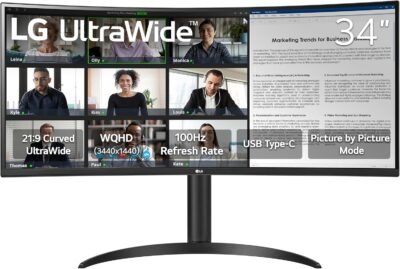
I chose the LG 34″ UltraWide Monitor because it balances size, performance, and usability in a single display. The curved 21:9 aspect ratio creates a more natural field of view, helping reduce eye movement and neck strain when working across multiple applications. The extra horizontal space is a productivity game‑changer for comparing documents, editing timelines, or tracking data without constantly alt‑tabbing.
In everyday use, what stands out is the comfortable viewing curve and crisp visuals that make long work sessions feel more breathable. Whether I’m drafting content, designing layouts, attending video meetings, or cataloging information, this monitor helps keep everything visible and accessible. For anyone upgrading from a standard 16:9 display, this UltraWide model delivers a tangible productivity boost.
Best For
Remote and hybrid workers
Creative professionals
Data analysts and researchers
Multitaskers and power users
Key Features
Key Features:
34″ UltraWide curved display – Expansive, immersive workspace
21:9 aspect ratio – Fit multiple windows comfortably
High resolution – Sharp visuals for productivity & media
AMD FreeSync compatible – Smooth motion for video & casual gaming
Ergonomic adjustments – Tilt and height options for comfort
Multiple inputs – HDMI and DisplayPort connectivity
Specs Table
| Feature | Details |
|---|---|
| Brand | LG |
| Model | 34″ UltraWide Monitor |
| Screen Size | 34 inches |
| Aspect Ratio | 21:9 |
| Display Type | Curved ultra‑wide panel |
| Resolution | High‑definition (varies by exact model) |
| Refresh Rate | Standard (varies by region) |
| Inputs | HDMI, DisplayPort |
| Stand | Tilt and height adjustable |
| Use | Productivity, multitasking, media |
How the LG 34″ UltraWide Monitor Works
This monitor uses a curved 21:9 panel to give you a wider, more immersive viewing experience than traditional 16:9 displays. You can place multiple windows side by side without feeling cramped, which is ideal for multitasking. The curve helps keep peripheral content within your natural field of view, reducing eye movement and improving comfort over long hours at the desk.
Connectivity via HDMI and DisplayPort ensures compatibility with laptops, desktops, and creative workstations. The adjustable stand helps you fine‑tune viewing height and angle for ergonomic comfort.
LG 34″ UltraWide Monitor vs Other Displays
vs Standard 16:9 Monitors:
Standard widescreens limit horizontal space. The UltraWide format offers significantly more width, reducing the need for dual‑monitor setups while keeping workflow seamless.
vs Dual‑Monitor Setups:
A single UltraWide eliminates bezels between screens, creating a more coherent workspace and improving focus.
vs Other Ultrawide Displays:
Some ultrawides lack ergonomic flexibility or fall short on clarity. This LG model balances visual performance with ergonomic comfort and everyday usability — all at a strong value.
For most productivity and multitasking needs, it’s a well‑rounded choice with real real‑world impact.
Who This Is For
Professionals tackling complex workflows
Designers and editors needing room for tools and canvases
Gamers enjoying immersive casual play
Anyone who wants more screen without adding monitors
Who This Is Not For
Users needing ultra‑high refresh rates exclusively for competitive gaming
Workstations requiring professional color‑critical calibration
When to Use Your LG 34″ UltraWide Monitor
Daily work and multitasking
Spreadsheet layout and comparison tasks
Video editing timelines and creative workflows
Casual gaming or media watching
Virtual meetings with side‑by‑side reference materials
Frequently Asked Questions
Does this monitor support height adjustment?
Yes — tilt and height adjustments help you find a comfortable viewing setup.
Can I run multiple apps side by side?
Absolutely — the 21:9 aspect makes side‑by‑side multitasking natural and efficient.
Is the curve noticeable?
Yes — the curve enhances immersion and helps bring peripheral content into view.
Are gaming features included?
It’s compatible with AMD FreeSync and offers smooth motion for casual gaming.
Is it good for office productivity?
Yes — the expansive display is excellent for spreadsheets, documents, and creative tasks.
Related Collections
→ Smart Home Hub
→ Digital Nomad Tech
→ Productivity Tech
This page contains affiliate links. Purchasing through these links may earn a commission at no extra cost to you.
Reviews
There are no reviews yet.