
Why I Chose This Product
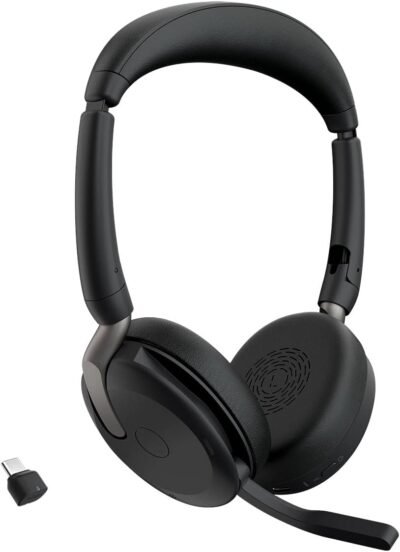
I chose the Jabra Evolve2 65 because it strikes an excellent balance between professional call performance and everyday comfort. The headset’s advanced noise‑cancelling microphones filter out background noise on both ends of the conversation, helping your voice come through clearly in busy environments. At the same time, the plush ear cushions and lightweight design make it comfortable to wear through long meetings, focus sessions, and work calls.
In everyday use, what stands out is the headset’s consistent Bluetooth connection and intuitive controls. Managing calls, adjusting volume, and controlling media are simple, and the reliable wireless range means you aren’t tethered to your desk. If you frequently juggle calls, presentations, and collaboration, this headset gives you a professional edge without complexity.
Best For
Remote and hybrid professionals
Frequent virtual meetings and calls
Contact center teams
Students attending online classes
Key Features
Key Features:
Advanced noise‑cancelling mics – Clear voice pickup in noisy environments
Wireless Bluetooth connectivity – Reliable pairing with laptops and phones
All‑day comfort design – Memory foam ear cushions and adjustable headband
Long battery life – All‑day use without frequent charging
Intuitive controls – Manage calls and volume on the headset
Busy light indicator – Signals “in a call” status to others
Specs Table
| Feature | Details |
|---|---|
| Brand | Jabra |
| Model | Evolve2 65 |
| Type | Wireless headset |
| Connectivity | Bluetooth (USB dongle included) |
| Microphones | Dual noise‑cancelling mics |
| Battery Life | Up to ~37 hours (varies by use) |
| Controls | On‑ear controls |
| Busy Light | Integrated |
| Use | Calls, collaboration, hybrid work |
| Comfort | Memory foam ear cushions |
How the Jabra Evolve2 65 Works
The Jabra Evolve2 65 pairs with your devices via Bluetooth or the included USB‑A dongle for reliable wireless performance. Dual noise‑cancelling microphones help isolate your voice while minimizing background noise, ensuring clarity during virtual meetings or calls. On‑ear controls let you answer calls, adjust volume, and manage playback with ease.
Memory foam ear cushions and a lightweight design support long sessions without discomfort. The integrated busy light signals to colleagues that you’re on a call, helping reduce interruptions in shared or open workspaces.
Jabra Evolve2 65 vs Other Headsets
vs Basic Bluetooth Headsets:
Standard Bluetooth headsets often lack advanced mic quality and comfort. The Evolve2 65’s noise‑cancelling mics and ergonomic design deliver clearer calls and longer wearing comfort.
vs USB‑Only Headsets:
USB‑only models restrict mobility. This wireless headset offers greater flexibility with both Bluetooth and USB‑dongle connectivity for laptops and phones.
vs Premium ANC Headphones:
While some premium ANC headphones focus on music and active noise cancellation, the Evolve2 65 prioritizes professional communication quality — making it ideal for work calls and virtual collaboration.
For hybrid professionals and frequent callers, this model hits the sweet spot between comfort, call clarity, and wireless convenience.
Who This Is For
Remote and hybrid professionals
Team members with heavy call schedules
Students and educators in online classes
Anyone prioritizing call clarity and comfort
Who This Is Not For
Users focused primarily on premium music listening
Those needing wired connectivity exclusively
When to Use Your Jabra Evolve2 65
Daily video and voice calls
Virtual meetings and presentations
Focused work sessions
Collaborative group calls
Frequently Asked Questions
Is it easy to pair?
Yes — simply use Bluetooth or the included USB dongle to connect to your computer or phone.
How is the call quality?
Excellent — advanced noise‑cancelling microphones help voices come through clearly, even in noisy environments.
Can I use them all day?
Yes — the comfortable ear cushions and long battery life support extended use.
Does it have controls on the headset?
Yes — play/pause, volume, and call answer/end are easily accessible.
Is the busy light helpful?
Absolutely — it signals to others that you’re on a call and minimizes interruptions.
Related Collections
→ Smart Home Hub
→ Digital Nomad Tech
→ Productivity Tech
This page contains affiliate links. Purchasing through these links may earn a commission at no extra cost to you.
Reviews
There are no reviews yet.