
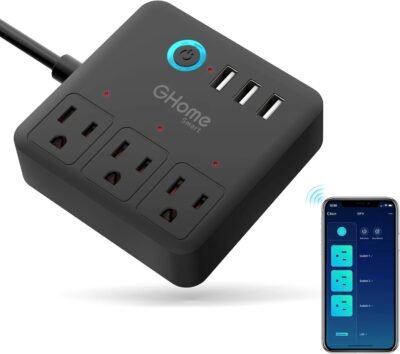
The GHome Smart Power Strip is designed to add intelligent control and convenience to your home or office setup. If you’re juggling multiple devices — computers, monitors, lamps, chargers, or accessories — this WiFi‑enabled power strip gives you individual control over each outlet and all four USB ports. With compatibility with Alexa and Google Home, customizable schedules, and a user‑friendly app, it makes managing your electronic devices easier and more efficient. I chose this model because it combines robust power delivery, smart automation, and flexible control options without requiring additional hubs — making it one of the most practical smart power strips for modern environments.
Best For
Home offices, remote workstations, gaming setups, media centers, and smart home enthusiasts needing centralized control over multiple plugged‑in devices.
Why This GHome Smart Power Strip Stands Out
Traditional power strips provide sockets and USB ports — that’s it. The GHome Smart Power Strip takes things to the next level by offering individual switching control for each outlet, plus all USB ports, through a simple app or voice assistant. It’s perfect for environments where you want granular control — for example, turning off a desk lamp while keeping a phone charger active.
I selected this product because of its balance of power management and smart features. Unlike basic smart plugs that control one outlet at a time, this strip handles three outlets and four USB ports independently. That means you can automate routines for work hours, night mode, or entertainment sessions without juggling multiple devices. The strip connects directly to your WiFi network — no hub required — and integrates seamlessly with both Alexa and Google Home, allowing voice commands like “Alexa, turn off outlet two.”
In real use, I’ve found the scheduling options particularly useful for power saving, such as setting office equipment to shut down at a certain time or automatically powering up lights and devices in the morning. The 4‑foot extension cord also adds flexibility in placement, making it suitable for desks, shelves, TV stands, or media centers.
Key Features
Key Features:
3 individually controlled outlets – Manage each plug independently
4 USB ports – Power multiple devices without extra chargers
WiFi connectivity (no hub required) – Quick setup with app control
Voice control support – Works with Alexa and Google Home
Schedules & automation – Set on/off routines for each device
4‑Foot extension cord – Flexible placement options
Overload protection – Safety‑focused design
Compact design – Keeps desks and spaces tidy
Specs Table
| Feature | Details |
|---|---|
| Brand | GHome |
| Model | Smart Power Strip with 3 Outlets & 4 USB |
| Connectivity | WiFi (2.4 GHz) |
| Compatible Platforms | Alexa, Google Home, GHome App |
| Outlet Control | Individually controllable 3 outlets |
| USB Ports | 4 USB charging ports |
| Scheduling | App‑based automation |
| Extension Cord | 4‑foot length |
| Plug Type | Smart outlet strip |
| Power Rating | Up to standard household rating |
| Safety | Overload protection |
| Ideal Use | Home offices, media centers, desks |
How the GHome Smart Power Strip Works
The GHome Smart Power Strip connects to your home WiFi and is controlled through the GHome app or voice commands via Alexa or Google Assistant. Each outlet and USB port can be managed separately, so you can turn specific devices on or off without affecting others. The app allows you to create schedules or group controls, making it easy to automate daily power routines.
From experience, this works best when you assign devices by purpose — for example, desk electronics for work hours, entertainment stations for evening mode, and chargers for nighttime charging. Automating power states reduces wasted energy and enhances convenience.
GHome Smart Power Strip vs Other Smart Power Solutions
vs Standard Power Strips: Traditional strips only provide power; GHome adds intelligent control and automation for every outlet and USB port.
vs Individual Smart Plugs: Smart plugs control single outlets; this strip consolidates control for multiple devices in one unit.
vs Surge Protectors With USB: Some surge strips offer multiple USB outlets but lack smart app control or automation.
For users wanting centralized control, automation, and voice access for multiple devices without clutter or hubs, this smart strip provides the best balance of features and usability.
Who This Is For
Home office setups needing multi‑device automation
Tech enthusiasts arranging smart spaces
Gamers and media lovers with multiple devices
Renters needing non‑invasive smart power management
Alexa or Google Home users expanding their ecosystem
Who This Is Not For
Outdoor or weather‑exposed setups
Users without WiFi access
Those requiring industrial‑grade smart power systems
When to Use Your GHome Smart Power Strip
Workdays: Automate office equipment routines
Evening Relaxation: Schedule power on/off for entertainment devices
Charging Stations: Manage multiple USB devices in one strip
Energy Savings: Turn off idle electronics with schedules
Voice Control: Hands‑free power management with Alexa/Google
Frequently Asked Questions
Can I control the outlets independently?
Yes, each of the three outlets and the USB ports can be controlled individually via app or voice command.
Does this work with Alexa and Google Home?
Yes, it seamlessly integrates with Alexa and Google Assistant for convenient voice commands.
Is a hub required to run this strip?
No — it connects directly to your 2.4 GHz WiFi network.
Can I schedule devices to turn on/off automatically?
Yes, the app allows you to set schedules for each outlet or port.
Does it support surge protection?
It includes safety design features but isn’t marketed as a heavy‑duty surge protector; keep high‑load electronics in check.
Can this be used outdoors?
No — designed for indoor environments like home offices or media centers.
Explore More Smart Power Accessories
→ Smart Plugs & Outlets
→ Voice‑Activated Home Automation Devices
→ Smart Home Lighting Solutions
This page contains affiliate links. Purchasing through these links may earn a commission at no extra cost to you.
Reviews
There are no reviews yet.