
Why I Chose This Product
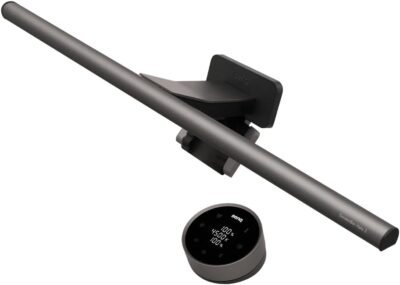
I chose the BenQ ScreenBar Plus because it combines functionality, eye-care technology, and minimal desk footprint. Unlike traditional desk lamps, it mounts directly on the monitor, saving space while providing targeted lighting that doesn’t reflect on your screen.
In daily use, the standout feature is the ambient light sensor which automatically adjusts brightness based on your environment. Manual controls allow fine-tuning color temperature and intensity, making it suitable for reading, writing, video calls, or creative tasks. For anyone wanting a clutter-free desk with healthy lighting, this monitor light is an excellent choice.
Best For
Remote workers and hybrid professionals
Students and online learners
Designers and content creators
Anyone needing glare-free, adjustable desk lighting
Key Features
Key Features:
Halo light design – Evenly illuminates desk without screen glare
Adjustable brightness and color temperature – Tailor lighting to tasks
USB-powered – Easy setup with minimal cables
Auto-dimming sensor – Adapts to ambient light conditions
Monitor-mounted – Saves desk space and keeps surface clear
Minimalistic, modern design – Blends with any workspace
Specs Table
| Feature | Details |
|---|---|
| Brand | BenQ |
| Model | ScreenBar Plus |
| Type | Monitor-mounted LED desk light |
| Power | USB-powered |
| Brightness | Adjustable |
| Color Temperature | Adjustable (cool to warm) |
| Mounting | Clip-on to monitor |
| Use | Home or office workstation |
| Special Feature | Auto-dimming ambient light sensor |
How the BenQ ScreenBar Plus Works
The ScreenBar Plus clips securely to the top of your monitor and directs light downward onto your desk. The built-in ambient light sensor automatically detects surrounding light conditions and adjusts brightness for optimal comfort. Color temperature and brightness can also be manually adjusted via the control dial, giving you personalized lighting for reading, typing, or creative work.
BenQ ScreenBar Plus vs Other Desk Lamps
vs Standard Desk Lamps:
Traditional lamps often take up desk space and create glare on screens. The ScreenBar Plus eliminates clutter while preventing reflections.
vs Monitor-mounted LED Lights:
Some models offer fixed brightness or no color adjustment. BenQ’s ScreenBar Plus adds both auto-dimming and adjustable color temperature, creating a more flexible, eye-friendly solution.
vs Premium Smart Desk Lamps:
While some smart lamps can adjust via apps, they often occupy desk space. This monitor-mounted light maximizes desktop efficiency while delivering professional-level illumination.
Who This Is For
Professionals and remote workers
Students and hybrid learners
Designers, editors, and creatives
Anyone upgrading desk lighting for comfort and productivity
Who This Is Not For
Users requiring floor-standing or overhead lighting
Environments where monitor mounting is impossible
When to Use Your BenQ ScreenBar Plus
Daily computer work and study sessions
Reading, writing, or coding
Video calls and virtual meetings
Creative or design tasks requiring glare-free lighting
Frequently Asked Questions
Is it easy to install?
Yes — it clips to most monitor sizes and is USB-powered, no tools required.
Does it reduce eye strain?
Yes — it provides glare-free illumination and adjustable color temperature.
Can I adjust brightness?
Yes — both automatic and manual adjustment are available.
Is it compatible with ultrawide monitors?
Yes — the clip can accommodate larger monitor widths.
Does it take up desk space?
No — it mounts directly on the monitor, keeping your desk clear.
Related Collections
→ Smart Home Hub
→ Digital Nomad Tech
→ Productivity Tech
This page contains affiliate links. Purchasing through these links may earn a commission at no extra cost to you.
Reviews
There are no reviews yet.