
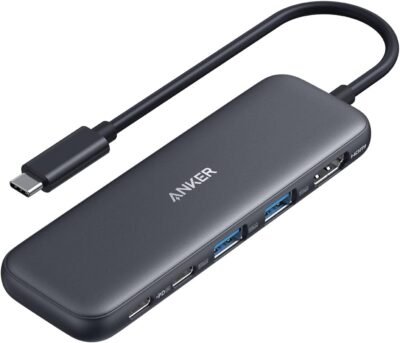
Why I Chose This Product
I chose the Anker USB-C Hub (5-in-1) because it combines essential ports in one device without adding bulk. Its reliable Anker build ensures stable connections, fast data transfer, and easy use with USB-C laptops. For anyone juggling multiple devices, this hub simplifies setup for work, school, or travel.
Best For
Professionals who connect multiple devices to their laptop
Students needing HDMI output for presentations
Travelers who want portable connectivity
Anyone using MacBook, ThinkPad, or USB-C laptops with limited ports
Key Features
5-in-1 functionality – HDMI, USB-A, SD, microSD, and USB-C pass-through
HDMI output – Supports 4K resolution
Compact design – Lightweight and portable for travel
Fast data transfer – Up to 5Gbps on USB-A ports
Plug-and-play – No software needed
Specs Table
| Feature | Details |
|---|---|
| Brand | Anker |
| Model | USB-C Hub 5-in-1 |
| Ports | HDMI, USB-A x2, SD, microSD, USB-C pass-through |
| HDMI | Up to 4K @ 30Hz |
| Data Transfer | Up to 5Gbps |
| Compatibility | USB-C laptops (MacBook, ThinkPad, Dell, HP, etc.) |
| Plug & Play | Yes |
| Weight | 1.6 oz (45 g) |
How It Works
Plug the Anker USB-C Hub into your laptop’s USB-C port. Connect your devices to the hub—monitor via HDMI, external drives via USB-A, SD cards for media transfer, and USB-C for power passthrough. No installation required.
Anker USB-C Hub vs Competitors
Compact design – Smaller and more portable than most multi-port hubs
Reliable Anker brand – Known for stable connections
Affordable – All-in-one solution for under $50
Plug-and-play – No drivers or setup required
Who This Is For
Remote workers connecting multiple peripherals
Students needing HDMI output for school projects
Travelers who want a lightweight, versatile hub
MacBook, ThinkPad, and other USB-C laptop owners
Who This Is Not For
Laptops without USB-C ports
Users needing specialized high-speed Thunderbolt 4 features
When to Use Anker USB-C Hub
Home office for connecting monitor, drives, and peripherals
On-the-go for presentations or media transfer
While traveling for versatile laptop connectivity
Anytime your laptop’s ports are limited
Frequently Asked Questions
Does it support 4K video?
Yes, HDMI port supports 4K at 30Hz.
Can I charge my laptop through the hub?
Yes, USB-C pass-through supports power delivery.
Is it compatible with Windows and Mac?
Yes, works with USB-C laptops including MacBook, ThinkPad, Dell, HP, and more.
Do I need to install drivers?
No, it’s plug-and-play.
Related Collections
→ Amazon Hidden Gems Under $30
→ Tech Gifts
→ Budget Smart Home
Affiliate Disclaimer: This page contains affiliate links. Purchases through these links may earn a commission at no extra cost to you.


Reviews
There are no reviews yet.