
Why I Chose This Product
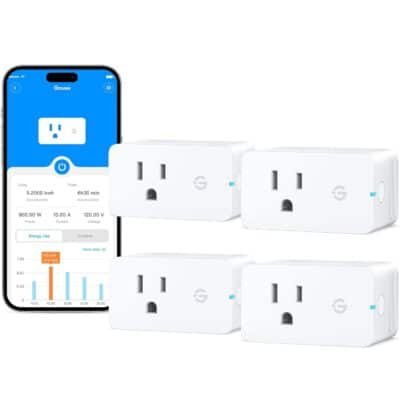
I chose the Govee Smart Plug with Energy Monitoring because it’s more than a basic on/off outlet — it monitors power usage and offers automation through the Govee Home App. Being able to see real‑time power, voltage, and historical energy data helps optimize usage and reduce electric costs. The intuitive app makes it easy to schedule devices for daily routines (like lamps or holiday lights), and voice assistant integration adds convenient hands‑free control. Its compact design also leaves adjacent outlets free, making it a versatile addition to any smart home setup.
Best For
Smart home beginners and tech enthusiasts
Families or individuals managing multiple devices
Energy‑conscious users who want usage insights
Routine automation for lamps, fans, or small appliances
Users who prefer voice control with Alexa or Google Assistant
Key Features
Key Features:
Wi‑Fi & Bluetooth connectivity – Easy setup with the Govee Home App
Real‑time energy monitoring – Track power (W), current (A), voltage (V) and usage history
Remote control – Turn devices on/off from anywhere via app
Scheduling & timers – Automate routines for daily habits
Voice assistant support – Works with Alexa and Google Assistant
Group control – Manage multiple plugs simultaneously
Compact design – Doesn’t block other outlets
Specs Table
| Feature | Details |
|---|---|
| Brand | Govee |
| Connectivity | Wi‑Fi (2.4 GHz), Bluetooth |
| Functions | Remote control, energy monitoring, scheduling |
| Voice Control | Alexa, Google Assistant |
| Power Monitoring | Real‑time and historical usage |
| Hub Needed | No |
| Use Case | Electronics & appliance automation |
How the Govee Smart Plug Works
The smart plug connects to your 2.4 GHz Wi‑Fi network (plus Bluetooth for initial pairing) and appears in the Govee Home App. From there, you can toggle connected devices on/off from anywhere, set specific on/off schedules for daily routines, and view real‑time energy data to understand how much electricity each device uses. You can also group multiple plugs together for simultaneous control or use voice commands to operate them hands‑free with Alexa or Google Assistant.
Smart Plug vs Basic Outlet
vs Standard Outlets:
Basic outlets are always on/off manually. This smart plug adds remote control, automation, and energy insights for smarter device management.
vs Basic Smart Plugs:
Many smart plugs offer on/off and scheduling only. The Govee model also monitors real‑time and historical energy usage, helping identify energy‑hungry devices.
vs Hub‑Required Systems:
No hub needed — the plug connects directly to Wi‑Fi and Bluetooth, simplifying setup and use.
Who This Is For
Home automation newcomers
Energy savers and eco‑minded users
Remote workers controlling desk or office electronics
Families managing shared devices in common areas
Who This Is Not For
Devices requiring very high power loads (large appliances/heavy machinery)
Users without stable 2.4 GHz Wi‑Fi connections
Those who want only voice control without app automation
When to Use Your Smart Plug
Daily routines like lamps or fans turning on/off
Holiday lighting automation
Monitoring power usage of entertainment systems
Scheduling devices for energy savings
Frequently Asked Questions
Can you see energy usage in the app?
Yes — the plug reports real‑time power, current, and voltage, plus daily/weekly/monthly usage data.
Does it work with voice assistants?
Yes — compatible with Alexa and Google Assistant for hands‑free control.
Is a hub required?
No — connects directly via Wi‑Fi and Bluetooth.
Can I group multiple plugs?
Yes — you can control several plugs at once in the app.
Is it safe for high‑power devices?
It supports up to ~15 A/1800 W, suitable for many household devices.
Related Collections
→ Smart Home Hub
→ Wellness Tech
→ Baby Tech
This page contains affiliate links. We may earn commission from qualifying purchases, at no extra cost to you.


Reviews
There are no reviews yet.