
Why I Chose This Product
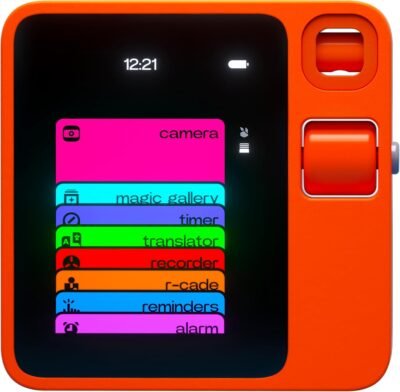
I chose the Rabbit R1 because it represents one of the first consumer attempts at a dedicated AI-native device — designed specifically for voice-first interaction and action-oriented assistance rather than just browsing or basic commands. With its natural language interface, push-to-talk design, touchscreen, and rotating camera, it aims to be both intuitive and multifunctional. Users can ask it to research topics, translate languages, take notes, and even automate routine digital tasks — all using voice or simple controls.
Whether you’re trying to minimize screen time, free up cognitive load, or experiment with modern AI interfaces, the R1 introduces a new way to interact with technology and get things done.
Best For
AI and tech enthusiasts
Users seeking voice-centric task management
Travelers & remote workers
People wanting hands-free digital interactions
Those curious about wearable and dedicated AI devices
Key Features
Key Features:
Voice-activated AI assistant – Engage AI via push-to-talk for queries and actions
Large Action Model (LAM) – Designed to understand complex requests and perform tasks
2.88″ touch display – Visual feedback and interaction complementing voice commands
Rotating camera (“rabbit eye”) – For video calls and contextual vision tasks
Smart task automation – Ask the device to handle multi-step web tasks
Wi-Fi + Cellular support – Stay connected on the go (unlocked SIM support)
Compact, portable design – Pocket-sized with tactile controls and intuitive scrolling
On-device voice and AI pipelines – Cloud-assisted but voice-first interaction
Specs Table
| Feature | Details |
|---|---|
| Brand | Rabbit |
| Model | R1 |
| Operating System | rabbitOS (Android-based AI OS) |
| Display | 2.88″ touchscreen |
| Processor | MediaTek Helio P35 |
| Memory | 4 GB RAM |
| Storage | 128 GB internal |
| Camera | Rotating 8 MP “rabbit eye” |
| Connectivity | Wi-Fi, Cellular (SIM) |
| Interaction | Voice + touchscreen + scroll wheel |
| Ideal Use | AI task automation & voice assistance |
How the Rabbit R1 Works
The Rabbit R1 runs a custom AI operating system (rabbitOS) that interprets spoken requests and aims to take action across services and tasks. Instead of just returning information like traditional AI assistants, the R1’s underlying Large Action Model (LAM) is designed to learn how to perform tasks for you — such as booking rides, ordering food, managing errands, and responding to complex queries — through natural language commands.
A touchscreen, push-to-talk button, and intuitive scroll wheel simplify interaction, while the rotating camera adds a visual dimension for video calls and contextual AI tasks. Real-time connectivity enables on-the-go use via Wi-Fi or cellular.
Rabbit R1 vs Other AI Devices
vs Smartphone Assistants:
Smartphone assistants often pull information or guide you to apps. The Rabbit R1 attempts to perform actions on your behalf, not just point you to results.
vs Smart Speakers or AI Pins:
Standard smart speakers focus on basic commands (weather, timers). The R1 aims for task automation and deeper AI interaction — albeit with evolving software support.
vs Standard LLM Chat Devices:
Unlike purely software-based LLM devices, the R1 is dedicated hardware with tactile controls, a display, a camera, and connectivity designed around AI interaction.
Who This Is For
Early adopters exploring AI-centric devices
Professionals who want easier task automation
Users who enjoy experimenting with new user interfaces
People interested in reducing smartphone screen time
Who This Is Not For
Those seeking a traditional smartphone replacement
Users who prefer minimal tech or basic assistants
People uninterested in evolving AI hardware
When to Use Your Rabbit R1
For quick AI answers on the go
When hands-free assistance is needed
For language translation in real time
During travel to simplify planning
To delegate repetitive digital tasks
Frequently Asked Questions
What can Rabbit R1 do?
It uses AI to answer questions, translate languages, take notes, and automate multi-step tasks across connected services.
Does it need Wi-Fi?
Yes — Wi-Fi or cellular connectivity (via unlocked SIM) is required for full AI functionality.
Is a subscription required?
No — the core functionality does not require a recurring subscription.
Can it replace my smartphone?
It can assist with many tasks but currently does not fully replicate all smartphone capabilities.
Does it support video calls?
Yes — the rotating camera can be used for video interactions.
Related Collections
→ Smart Home Hub
→ Wellness Tech
→ Audio Tech
This page contains affiliate links. Purchasing through these links may earn us a commission at no extra cost to you.




Reviews
There are no reviews yet.