
Why I Chose This Product
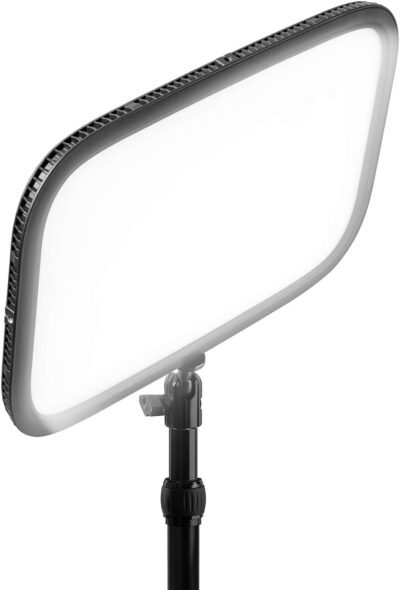
I chose the Elgato Key Light because it combines adjustable, high-quality lighting with user-friendly controls. Unlike basic desk lamps or ring lights, the Key Light can be mounted or positioned to optimize your video framing while minimizing glare and shadows. Its app-based controls allow you to tweak brightness and color temperature in real-time from your computer or smartphone, offering convenience and precision.
In daily use, what stands out is the consistent, flicker-free illumination that works for any camera setup — from webcams to professional cameras. For hybrid professionals or content creators, it ensures you look sharp and well-lit during every virtual meeting or recorded session.
Best For
Streamers and content creators
Remote professionals on video calls
Educators teaching online
Video conferencing and webinars
Key Features
Key Features:
Adjustable brightness and color temperature – Tailor light to environment and skin tone
App-controlled – Easy control via desktop or mobile app
Flicker-free LED – Smooth, professional-quality lighting
Desk or boom mountable – Flexible positioning for any setup
Energy-efficient LED – Long-lasting and eco-friendly
Professional-grade illumination – Reduces shadows and enhances visual quality
Specs Table
| Feature | Details |
|---|---|
| Brand | Elgato |
| Model | Key Light |
| Type | LED panel |
| Control | Desktop or mobile app |
| Brightness | Adjustable up to 2800 lumens |
| Color Temperature | 2900–7000K |
| Mount | Desk clamp or boom arm |
| Use | Streaming, video calls, content creation |
| Compatibility | Windows, macOS |
| Power | Plug-in |
How the Elgato Key Light Works
The Elgato Key Light connects via Wi-Fi to your desktop or mobile app, allowing for precise adjustments of brightness and color temperature without physically touching the light. Once positioned using its desk clamp or boom arm, it provides even, flicker-free illumination that enhances skin tones and reduces shadows. Multiple lights can be controlled simultaneously for multi-light setups.
Elgato Key Light vs Other Lighting Options
vs Desk Lamps or Ring Lights:
Standard desk lamps or small ring lights often lack adjustable color temperature and consistent brightness. Key Light delivers professional-grade, customizable lighting.
vs Other Streaming Lights:
Many streaming lights require manual adjustment. Key Light’s app-based controls provide convenience and precise tuning in real time.
vs Studio Lighting Panels:
Studio panels can be bulky and difficult to adjust. Key Light is compact, easy to mount, and optimized for home or office streaming setups while delivering comparable lighting quality.
Who This Is For
Streamers and professional content creators
Remote workers attending video meetings
Educators hosting online classes
Anyone seeking polished, professional on-camera lighting
Who This Is Not For
Users needing portable battery-powered lighting
Those seeking simple decorative lighting only
When to Use Your Elgato Key Light
Video calls and virtual meetings
Streaming, YouTube, and content creation
Podcasting with camera setups
Recording tutorials or online classes
Frequently Asked Questions
Is it easy to control brightness and color temperature?
Yes — via desktop or mobile app, adjustments are fast and precise.
Can I mount it on a desk or arm?
Yes — it supports both desk clamps and boom arms.
Does it flicker on camera?
No — flicker-free LED provides smooth, professional-quality illumination.
Can I control multiple Key Lights simultaneously?
Yes — multiple units can be linked and controlled via the app.
Is it suitable for webcams?
Absolutely — optimized to provide flattering, consistent lighting for webcams or professional cameras.
Related Collections
→ Smart Home Hub
→ Digital Nomad Tech
→ Productivity Tech
This page contains affiliate links. Purchasing through these links may earn a commission at no extra cost to you.

Reviews
There are no reviews yet.