
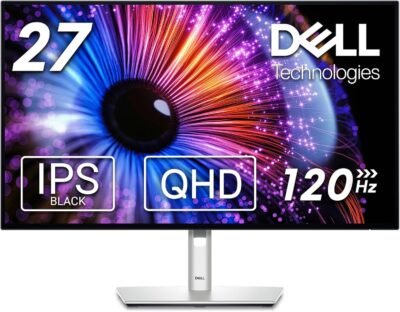
Why I Chose This Product
I chose the Dell UltraSharp U2723DE because it strikes the perfect balance between professional performance and everyday usability. The QHD resolution provides a crisp and detailed image that’s easy on the eyes during extended use, while the integrated USB-C hub simplifies desk cable clutter by enabling power delivery, data transfer, and display signal through a single cable.
The standout in daily use is the consistent, accurate color and contrast performance, making everything from spreadsheets to design work look clear and natural. Built-in adjustability — including height, tilt, swivel, and pivot — lets you tailor the view to your posture, improving comfort over long hours at the desk.
Whether you’re analyzing data, editing visual content, or taking back-to-back meetings, this UltraSharp monitor supports both productivity and focus without compromise.
Best For
Professionals and hybrid workers
Graphic designers and creative pros
Developers and coders
Students and researchers
Key Features
Key Features:
27” QHD (2560×1440) resolution – Sharp, detailed visuals
USB-C hub with power delivery – One cable for display, data, and power
Excellent color accuracy – Great for creative and professional tasks
Adjustable stand – Height, tilt, swivel, and pivot flexibility
Multiple inputs – HDMI, DisplayPort, USB-C connectivity
ComfortView Plus – Reduced blue light without loss of color integrity
Specs Table
| Feature | Details |
|---|---|
| Brand | Dell |
| Model | UltraSharp U2723DE |
| Screen Size | 27 inches |
| Resolution | QHD (2560×1440) |
| Panel Type | IPS / Advanced color accuracy panel |
| Connectivity | USB-C, HDMI, DisplayPort, USB hub |
| Stand | Adjustable (height, tilt, swivel, pivot) |
| Use | Professional & productivity |
| Aspect Ratio | 16:9 |
| Color Support | High color accuracy for design tasks |
How the Dell UltraSharp U2723DE Works
This monitor uses a high-performance QHD panel to deliver crisp, detailed visuals with accurate colors and wide viewing angles. The built-in USB-C hub allows you to connect a laptop with a single cable that carries video, data, and power — minimizing cable clutter and simplifying your workflow.
Ergonomic adjustments help you position the display at the ideal eye level and angle, reducing neck strain during long workdays. The combination of connectivity, clarity, and comfort makes this monitor a reliable centerpiece for focused productivity setups.
Dell UltraSharp U2723DE vs Other Monitors
vs Standard Office Monitors:
Standard displays often lack advanced color performance and robust connectivity. The U2723DE steps up with QHD resolution and a USB-C hub, bringing pro-grade flexibility to everyday workflows.
vs Budget 27” Displays:
Lower-cost models might offer similar size but fall short in color accuracy or ergonomic adjustments. The UltraSharp delivers consistent visual performance and adjustable comfort that improves long sessions at the desk.
vs Premium Creative Monitors:
While some premium models push ultra-wide or 4K panels at higher price points, this Dell monitor hits a sweet spot for professionals who need ample workspace, true-to-life visuals, and efficient connectivity — without overspending on features they may not use daily.
Who This Is For
Remote and hybrid professionals
Creatives needing color accuracy
Productivity-focused workers
Anyone upgrading from a basic laptop display
Who This Is Not For
Users requiring ultra-wide or 4K resolution for cinematic media
Gamers seeking high refresh rates above 120 Hz
When to Use Your Dell UltraSharp U2723DE
Daily work and multitasking
Design, photo, or video editing
Long research or writing sessions
Virtual meetings and collaboration
Frequently Asked Questions
Does this monitor support USB-C power delivery?
Yes — the USB-C connection provides power delivery along with data and video signal.
Can it pivot to portrait mode?
Yes — the adjustable stand supports pivot as well as height, tilt, and swivel.
Is it good for color-sensitive work?
Yes — the panel delivers strong color accuracy suitable for creative tasks.
Is the stand detachable?
Yes — it can be removed for VESA mounting if preferred.
Does it reduce eye strain?
Yes — ComfortView Plus reduces blue light emission without affecting color quality.
Related Collections
→ Smart Home Hub
→ Digital Nomad Tech
→ Productivity Tech
This page contains affiliate links. Purchasing through these links may earn a commission at no extra cost to you.
Reviews
There are no reviews yet.