
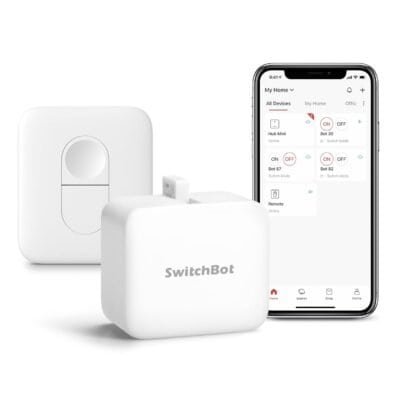
Best For: Smart home enthusiasts, apartment or office automation, DIY automation projects
Why This Product Stands Out
Many smart home devices require complicated rewiring or professional installation, but the SwitchBot Smart Switch Pusher keeps it simple. I was impressed by how easy it was to attach to existing switches and instantly control them with the app or remote. The compact design is discreet yet sturdy, and pairing it with the SwitchBot Hub Mini opens up Alexa, Google Home, and IFTTT integration for full automation. You can schedule lights, fans, or appliances to turn on or off, or control them with a single tap. This small gadget may seem minor, but it adds significant convenience and flexibility to any smart home setup without altering your existing wiring or devices.
Key Features
One-tap smart button for existing switches and appliances
Wireless operation via Bluetooth and app control
Timer and schedule automation for daily routines
Remote control included for manual operation
Alexa, Google Home, and IFTTT compatibility with SwitchBot Hub Mini
Compact, non-intrusive design for indoor use
Easy DIY installation — no wiring required
Durable and reliable pressing mechanism
Specs Table
| Feature | Detail |
|---|---|
| Connectivity | Bluetooth, optional Wi-Fi via SwitchBot Hub Mini |
| Smart Home Integration | Alexa, Google Home, IFTTT (Hub required) |
| Control Methods | App, timer, Bluetooth remote |
| Installation | Adhesive or clip-on, no wiring needed |
| Dimensions | 1.7 x 1.6 x 1.2 in |
| Weight | 0.7 oz (approx.) |
| Power | AAA batteries (included) |
| Use Case | Pressing switches, buttons, small appliances, automation routines |
Why I Chose This Product
I wanted a way to automate my existing switches without replacing them or doing complicated wiring, and the SwitchBot Smart Switch Pusher delivered perfectly. Setup is incredibly simple: stick it onto a switch or button, pair it with the app, and you’re ready to schedule or remotely control devices. It’s also extremely versatile — from lamps and coffee makers to smart lights that aren’t directly Wi-Fi-enabled, this device lets you bring them into your automated routines.
The combination of Bluetooth, app, and remote control ensures flexibility for every household member. Adding the SwitchBot Hub Mini expands functionality to Alexa, Google Home, and IFTTT, so you can include the pusher in your broader smart home routines, like “Good Morning” or “Away Mode.” Its small, unobtrusive design fits anywhere, and the mechanism is reliable enough to press switches repeatedly without slipping or failing. For anyone looking to upgrade convenience and automate everyday actions without overhauling their home, this device is a no-brainer.
Who Should Buy This
Homeowners or renters seeking smart home automation without wiring
Apartment dwellers wanting compact automation solutions
Users with multiple switches or appliances needing scheduled control
Smart home enthusiasts looking to integrate Alexa, Google Home, or IFTTT
Anyone who wants DIY, hassle-free installation
Who Should Not Buy This
Those without existing switches or buttons to automate
Users needing heavy-duty industrial automation
People looking for devices requiring direct high-power loads (>10A)
Those unwilling to use batteries or the SwitchBot app for setup
FAQ
Q: Can this press any type of switch?
A: It works with most standard rocker, toggle, and push-button switches, but very large or irregular switches may not be compatible.
Q: Does it require Wi-Fi?
A: No — it works via Bluetooth by default. Wi-Fi and smart home integration require the SwitchBot Hub Mini.
Q: Can I schedule multiple devices?
A: Yes, using the app, you can automate multiple switches or devices independently or in routines.
Q: How is installation?
A: Simply attach with the included adhesive or clip — no wiring or drilling required.
Q: Is it compatible with Alexa?
A: Yes, when paired with the SwitchBot Hub Mini, you can control it via Alexa, Google Home, or IFTTT.
Explore More Smart Home Accessories
“More One-Tap Automation Devices”
“More Wireless Smart Buttons & Switches”
“More DIY Smart Home Gadgets”
This page contains affiliate links. If you buy through these links, I may earn a commission at no extra cost to you.

Reviews
There are no reviews yet.